
In this article, you'll learn:
- What the Cooling Down Period is and why it's important
- Which Cooling Down Period options you can choose from
- How to configure it
- How to enable/disable Cooling Down Period for batch sendouts
- Some best practices on how to use the Cooling Down Period
💡 What the Cooling Down Period does
When candidates apply for multiple positions in your organization, they may receive multiple surveys in a short period of time.
The Cooling Down Period prevents this by stopping new survey sendouts - so candidates aren’t overwhelmed by repeated requests.
You have a few duration options to choose from:
- 2 weeks
- 1 month
- 2 months
- 3 months
- 4 months
- 5 months
- 6 months
👍 Tip: A 1–2 month Cooling Down Period often works best to prevent survey fatigue while keeping feedback fresh.
⚙️Cooling Down Period options
You can configure a Cooling Down Period on company-level or on stage-level. In this section, we'll break down the difference and provide example scenarios.
Company-wide
You can configure a Cooling Down Period across all of your surveys. When you do that, the feature will block surveys if a candidate has recently received any survey from your company.
📚 This does not include the Candidate Applied survey, which requires its own setting. This ensures candidates don’t receive multiple “Applied ” surveys in a short period, while still allowing them to receive other surveys later in the process (e.g., after being rejected or withdrawing).
Stage-level
You can configure a separate timeframe for each stage (e.g., Rejected, Withdrawn).
📝 Examples
If you choose to enable a company-level CDP
-
Candidate applies to Job A→ receives Applied survey
-
Applies to a second position (Job B) → Applied survey blocked by stage-level CDP*
-
Rejected from Job A → receives Rejected survey
-
Withdraws from from Job B → Withdrawn survey blocked by company-level CDP
*Candidate Applied always has its own CDP.
If you choose to enable a stage-level CDP
-
Candidate applies to Job A → receives Applied survey
-
Applies for a second position (Job B) → Applied survey blocked by stage-level CDP
-
Rejected from Job A → receives Rejected survey
-
Withdraws also from Job B → receives Withdrawn survey.
🧭 How to Set It Up
How to set up company-level CDP
Setting up a Company-Level Cooling Down Period ensures that all stages (except “Candidate Applied”) follow the same CDP rule.
Step-by-Step
1. Go to Settings
- From the menu on the left-hand side, select ⚙️ Settings.
2. Select Cooling Down Period
- In Settings, open the Cooling Down Period section.
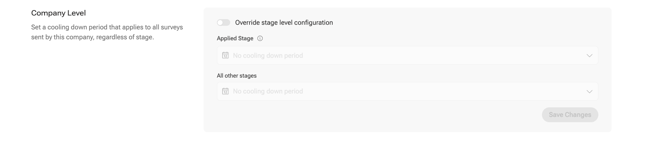
3. Enable Company-Level Cooling Down Period
- Toggle “Override stage-level configuration.”.
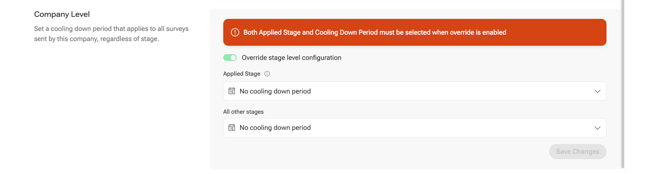
4. Set a Cooling Down Period for “Candidate Applied”.
The “Candidate Applied” touchpoint is always excluded from the company-level CDP. You’ll need to select a separate cooldown duration for this stage.
5. Choose a duration for all other stages
6. Save your changes!
How to set up a stage-level CDP
A Stage-Level Cooling Down Period lets you set unique CDP durations for each survey type — giving you more control over when candidates receive feedback.
Step-by-Step
1. Go to Settings
- From the menu on the left-hand side, click ⚙️ Settings.
2. Select Cooling Down Period
- Inside Settings, open the Cooling Down Period section.
3. Make sure you’re in the Stage-Level section (not Company-Level).
- Here you can configure each stage individually.
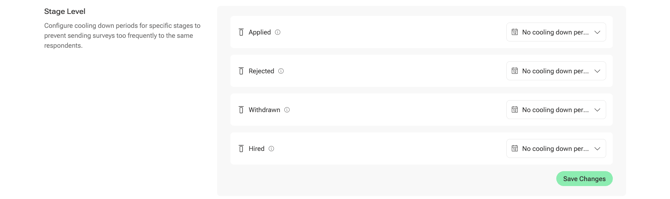
4. Set a Cooling Down Period duration for each stage
- Choose a period for every touchpoint:
-
-
Applied
-
Rejected
-
Withdrawn
-
Hired
-
-
- Select the duration (e.g., 2 weeks, 1 month, etc.) for each one.
5. Save your configuration
Disabling the Cooling Down Period for batch sendouts
In the Batch Sendout we implemented a toggle that gives the option to bypass the Cooling Down Period before sending out manual batches.
If this is enabled, any configured CDP will not be applied.

✨ Best Practices
-
Keep your Cooling Down Period short enough to maintain feedback flow but long enough to prevent repetition. A 1–2 month CDP works best to prevent survey fatigue while keeping feedback fresh.
-
Use stage-level Cooling Down Period for finer control over specific survey types.