
To set up your Thank You page, go to Survey Settings → Thank You Page.
📘 If you do not customize your Thank You page, Starred will display a generic default page.
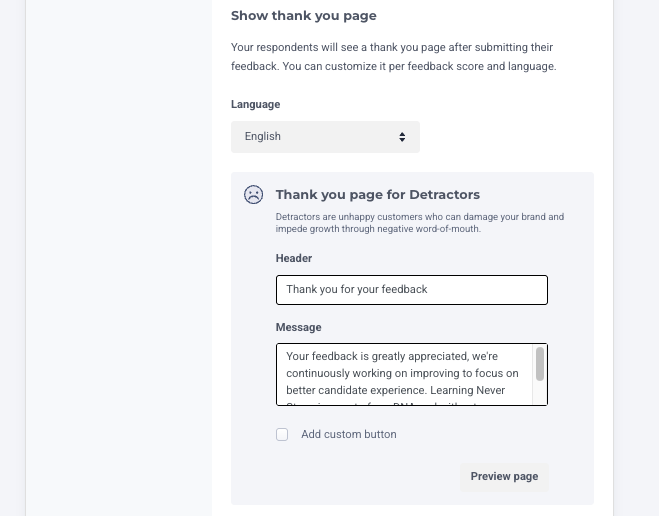
You can create different Thank You pages based on the NPS score a respondent gives (Detractors, Passives, Promoters)
If your survey does not include an NPS question, Starred will display the default/general Thank You page (same as the Passives page)
-
Click Preview Thank You Page to see exactly what respondents will see
-
You can redirect respondents to an external website, which is especially recommended for Promoters
-
Adding a button link allows Starred to track clicks and conversion rates (tracking available since March 30, 2021)
Translating Thank You pages
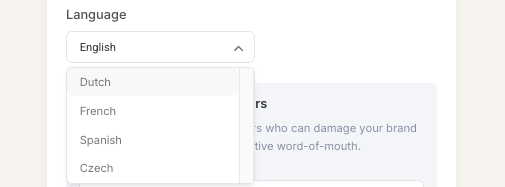
Thank You pages can be translated into multiple languages. Starred will display the correct version based on the survey language
-
Select a language from the dropdown
-
Preview or create your own page in that language
Survey-level Thank You page
👍 You can set survey-level Thank You pages to show targeted messages for different respondent groups (e.g., Candidates vs. Hiring Managers).
Steps:
-
Go to the Survey Overview in your Starred account
-
Find the survey you want to edit and click Edit
-
Click the ⚙️ icon to open Advanced Survey Settings
-
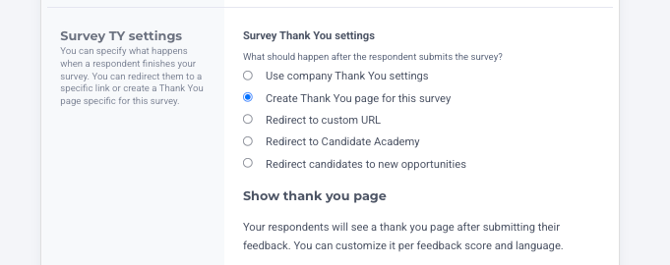
Scroll to Survey Thank You settings
-
Under What should happen after the respondent submits the survey?, select Create Thank You page for this survey
-
Customize your Thank You page:
-
Add a message for respondents
-
Configure different pages for different feedback scores (Detractors, Passives, Promoters)
- Add a button to redirect respondents to other websites like Glassdoor to leave a review (recommended for Promoters)
-
Translate into multiple languages if needed
-
-
Save your changes
📘 If you choose Use company Thank You settings, the survey will display the default company-wide Thank You page instead of a survey-specific page