
Understanding survey invitation statuses
Starred tracks the delivery of every survey invitation through Mailgun, our email delivery provider. You can see the status of each invitation when you open a sendout batch, and a bounce breakdown at the sendout level.
Where to find bounce data
In your sendout overview, each row shows a Bounced percentage alongside open, click, and answer rates.
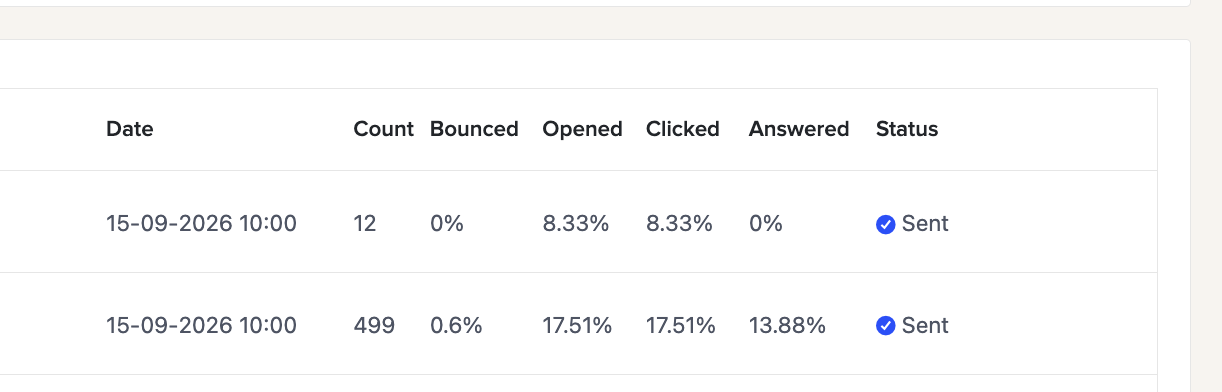
To see a breakdown of what caused the bounces, hover over the number in the Bounced column - a tooltip will show a breakdown by reason.
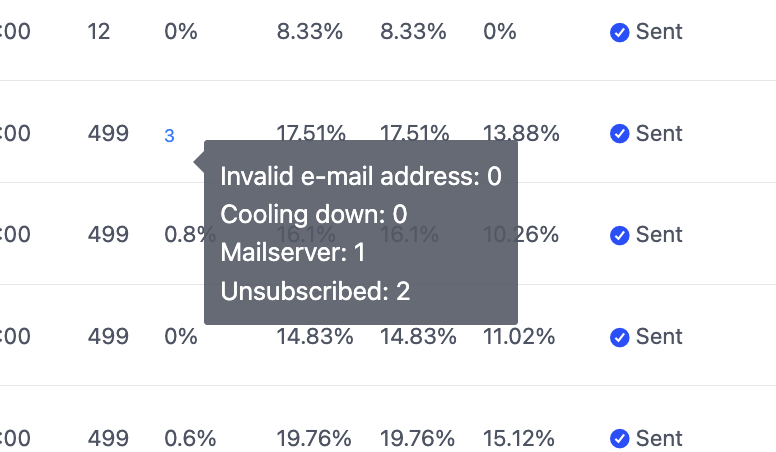
What the bounce reasons mean
Invalid email address
The email address doesn't exist or is incorrectly formatted. This usually means the address coming through from your ATS has a typo or belongs to someone who no longer has that account. Check the source data in your ATS for that candidate or hiring manager.
Mailserver
The recipient's mail server rejected the email. This can happen if their inbox is full, their server is temporarily unavailable, or their organization's mail filters blocked the message. These are often temporary - if it happens repeatedly for the same domain, it may be worth flagging to your IT team.
Cooling down
This recipient was temporarily skipped because they received a survey invitation recently. Starred applies a cooldown period to avoid over-surveying the same person. This is expected behaviour, not an error.
Unsubscribed
The recipient previously unsubscribed from Starred survey emails. Their preference is respected automatically and they won't receive future invitations.
What to do about a high bounce rate
A small number of bounces is normal in any sendout. If you're seeing a consistently high bounce rate, the most common causes are:
- Email addresses being used to send surveys (automated or manual) are outdated or incorrectly formatted
- A mail server or spam filter at the recipient's organization (mostly valid for internal surveys or surveys sent to company addresses) blocking the emails
If you're unsure what's driving your bounces or need help investigating, reach out to support@starred.com.
Other invitation statuses
When you open a batch, each recipient shows one of the following statuses coming from Mailgun:
Accepted
Starred has submitted the invitation and it's queued for delivery.
Delivered
The email was sent and accepted by the recipient's mail server. This doesn't confirm they've seen it - just that it arrived successfully.
Opened
The recipient opened the email and had image loading enabled.
Clicked
The recipient clicked a link in the email - typically the survey button.
Unsubscribed
The recipient clicked the unsubscribe link and will no longer receive survey invitations.